
Search Documentation
Search across all documentation pages, APIs and guides.
OnePay Unified Checkout.
Built to Be Sri Lanka's
Most Trusted Payment Page.
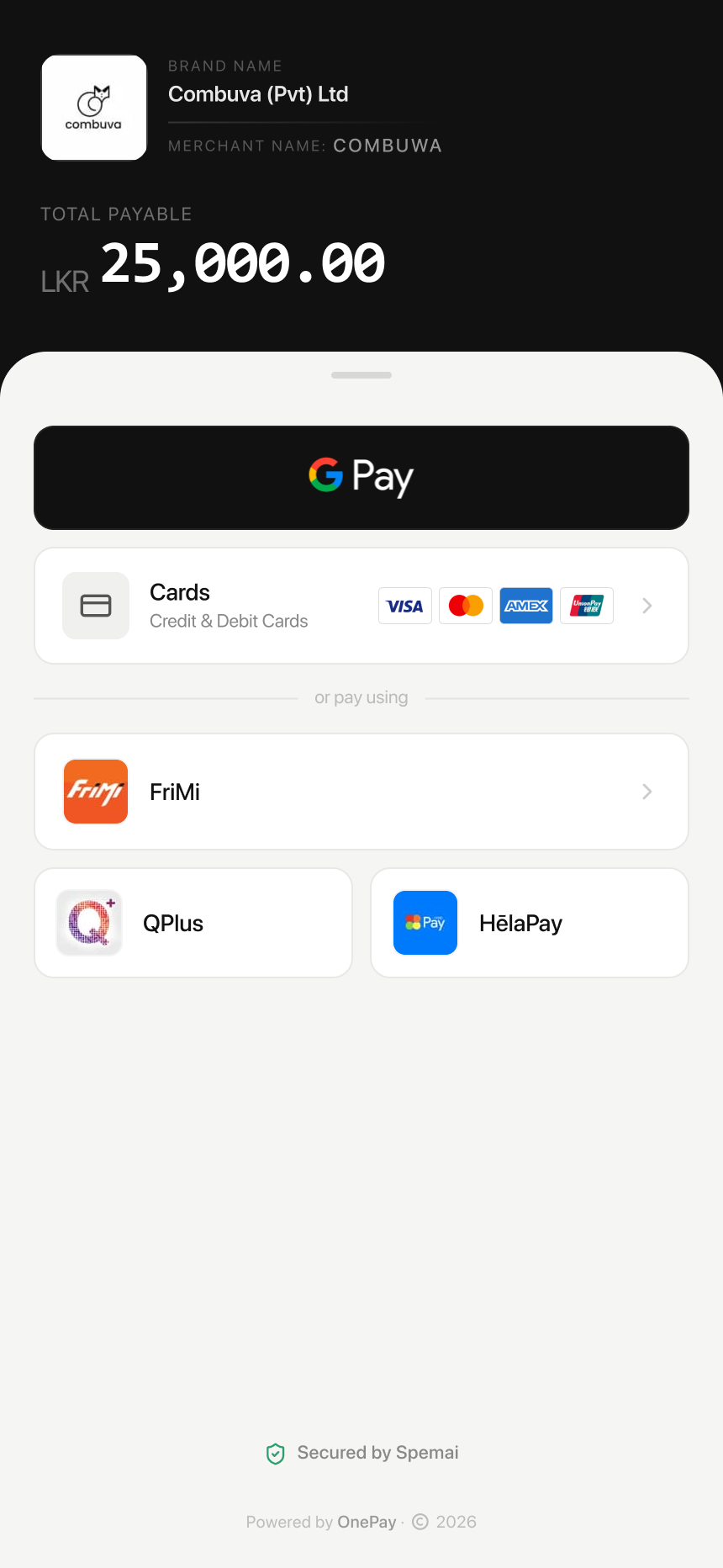
OnePay Checkout is a single, customisable payment page that accepts cards and local mobile wallets, carries your brand, and gives every customer a reason to trust the "Pay" button they are about to tap.
The Checkout Page Is Where Trust Is Won or Lost
A customer has already decided to buy. They have picked the product, agreed to the price, and clicked through to pay. This is the moment a sale either closes or quietly disappears.
Most of the time, what makes a customer hesitate at that final step is not the price. It is the page itself. A checkout that looks unfamiliar, carries no branding, or feels like it was bolted on from somewhere else makes people pause. And a pause at checkout is often the same thing as a lost sale.
This is exactly the problem OnePay Checkout was built to solve. One unified payment page, fully customisable to your brand, built to feel like a natural part of your business rather than a foreign detour.
One Checkout Page. Every Way Your Customer Wants to Pay.
OnePay Checkout is a hosted payment page that brings every payment method your customer might use into a single, clean screen. It shows your brand name, the exact amount due, and a clear reference number, so there is never any confusion about what is being paid for.
Fully Branded
Your business name and logo appear clearly on the checkout page. Customers see your brand, not a generic payment screen that feels disconnected from the purchase they just made.
Cards and Wallets Together
Visa, Mastercard, American Express, Diners Club, Discover, and UnionPay sit alongside local mobile wallets like FriMi, QPlus, and HēlaPay, all on one page.
3D Secure by Default
Every transaction processed through OnePay Checkout is protected with 3D Secure authentication. There are no exceptions, and no 2D fallback that leaves your business exposed.
Multi-Currency Ready
Accept payments in 10 supported currencies for customers paying from outside Sri Lanka, while your settlement always lands cleanly in LKR.
Works on Any Device
The checkout page is built to render cleanly on a phone, tablet, or desktop, because most of your customers are reaching for their phone, not a laptop.
Fast to Integrate
Whether you use OnePay's hosted checkout, a payment link, or the REST API, the same trusted payment experience appears every time, with no separate setup for each channel.
Every Card. Every Local Wallet. One Page.
Your customers should never have to think about which payment method will work. OnePay Checkout brings the full range of accepted methods into view, all at once, on the same screen.





Supported Currencies
OnePay supports 10 currencies, so customers paying from outside Sri Lanka can complete their purchase in a currency they recognise. Settlement to your bank account is always made in LKR, converted at the applicable exchange rate at the time of the transaction.


A Quick Compliance Note
Built on Four Years of Processing Real Payments
OnePay was launched in 2021 by Spemai Pvt Ltd, a technology company backed by a Japanese corporate investor since 2019. In the years since, it has grown into one of Sri Lanka's most widely used payment infrastructures.
- LKR 10B+ In payment volume processed
- 4,500+ Active merchants onboarded
- ISO 27001 Information security certified
OnePay was Sri Lanka's first payment gateway to achieve ISO 27001 certification, the global standard for information security management. For a business owner, that is not a technical footnote. It means the checkout your customers are typing their card details into has been independently audited against an internationally recognised security standard.
From Cart to Confirmed Payment, in One Smooth Page
Customer reaches the OnePay Checkout page
Whether triggered from your website, a payment link, or an invoice, the customer lands on a single page showing your brand, the amount due, and a clear reference number.
Customer chooses how to pay
Card or mobile wallet, all visible on the same screen. No separate pages, no redirect to a third-party app that breaks the flow of the purchase.
3D Secure authentication runs automatically
For card payments, the issuing bank sends a one-time password to the customer's phone. This step is mandatory on every OnePay transaction, with no exceptions.
Payment confirms instantly
The customer sees a clear confirmation. You receive an instant notification on your dashboard, and the transaction appears in your records right away.
Funds settle to your account on a T+2 schedule
OnePay transfers the net amount, after MDR and applicable fees, directly to your registered bank account two working days after the transaction, via CEFT transfer.
Three Ways to Use OnePay Unified Checkout
OnePay Checkout is not locked to a single setup. Choose the path that matches how technical your team is and how quickly you want to launch.
1. Hosted Checkout, No Code Required: Generate a payment link from your OnePay dashboard and share it anywhere. The customer taps the link and lands directly on your branded OnePay Checkout page.
2. Embedded Checkout for Your Website: Using OnePay JS, developers can embed the checkout experience directly into an existing website or app.
3. Full API Integration: For businesses with custom platforms, OnePay's REST API and SDKs allow complete control over the payment flow.
// Example: creating a payment link via the OnePay APIPOST https://api.onepay.lk/v1/payment-links{"amount": 25000.00,"currency": "LKR","reference": "ORD-2024-00847","description": "Order payment","app_id": "your_app_id"}
What Makes a Payment Gateway Actually Convenient
| What Matters | OnePay Checkout | Typical Alternative |
|---|---|---|
Branded checkout page | Your logo and name shown | Often generic or unbranded |
Cards and wallets on one screen | Yes | Often split across pages |
Mandatory 3D Secure | Every transaction | Varies by provider |
No-code payment links | Built in | Often requires a developer |
Transparent payout schedule | T+2, clearly documented | Often unclear or delayed |
Local mobile wallet support | FriMi, QPlus, HēlaPay | Frequently missing |
Frequently Asked Questions
Is OnePay Checkout customisable to match my brand?
Yes. Your business name and logo appear on the checkout page, so customers see a payment experience that feels connected to the purchase they just made.
How quickly do I receive my money after a sale?
OnePay operates on a T+2 payout schedule for most payment methods. Funds are transferred directly to your registered bank account via CEFT.
Is 3D Secure required for every transaction?
Yes. OnePay mandates 3D Secure authentication on all card transactions with no exceptions. This protects your business from fraud liability.
Give Your Customers a Checkout They Actually Trust.
Set up OnePay Checkout in minutes. One branded page, every card and wallet your customers use, and 3D Secure protection built in from day one.
Talk to our teamOn This Page